樹狀資料繫結控制項一般呈現為樹狀結構,使用的資料來源也是具有樹狀結構的資料,像是XML或是SiteMap等資料。
簡而言之,只要2個步驟:
- 繼承自HierarchicalDataBoundControl
- 改寫PerformDataBinding(),取得資料來源,並進行資料繫結。
第2步驟相當於一般資料繫結控制項的PerformSelect()和PerformDataBinding()。
為什麼不是使用PerformSelect()和PerformDataBinding()?關鍵在於"樹狀"結構,必須要使用遞迴來處理,一層一層的往下構建。
在細節方面,有幾個地方需要注意:
- 如果已經初始化資料繫結控制項,而資料來源在PreRender事件後變更,那麼就必須要執行OnDataPropertyChanged()方法。
if (Initialized) //BaseDataBoundControl.Initialized
{
    OnDataPropertyChanged(); //BaseDataBoundControl.OnDataPropertyChanged()
}
- 需使用樹狀列舉IHierarchicalEnumerable介面來處理資料。包括IHierarchicalEnumerable.GetHierarchyData()方法與IHierarchyData介面。
private void RecurseDataBindInternal(TreeNode RootNode, IHierarchicalEnumerable enumerable, int depth)
{
    foreach (object item in enumerable)
    {
        IHierarchyData data = enumerable.GetHierarchyData(item);
        ...
    }
}
- 如果有設定DataTextField就使用DataBinder.GetPropertyValue()來取取得屬性,不然就用TypeDescriptor.GetProperties()來做。
if (DataTextField.Length > 0)
{
    System.Xml.XmlElement elm = data.Item as System.Xml.XmlElement;
    if (elm.HasAttributes)
    {
        newNode.Text = DataBinder.GetPropertyValue(data, DataTextField, null);
    }
    else
    {
        newNode.Text = "(Family)";
    }
}
else
{
    PropertyDescriptorCollection props = TypeDescriptor.GetProperties(data);
    newNode.Text = string.Empty;
    if (props.Count >= 1)
    {
        if (null != props[0].GetValue(data).ToString())
        {
            newNode.Text = props[0].GetValue(data).ToString();
        }
    }
}
- 遞迴使用自訂義RecurseDataBindInternal()方法來新增結點並進行資料繫結。
IHierarchicalEnumerable enumerable = view.Select();
if (enumerable != null)
{
    Nodes.Clear();
    try
    {
        RecurseDataBindInternal(RootNode, enumerable, 1);
    }
    catch(Exception e)
    {
    }
}
主要的程式碼如下(已修正MSDN中屬性的BUG):
namespace Samples.AspNet.CS.Controls
{
    [ToolboxData("<{0}:GeneologyTree runat=server></{0}:GeneologyTree>")]
    public class GeneologyTree:HierarchicalDataBoundControl
    {
        private TreeNode rootNode;
        public TreeNode RootNode
        {
            get
            {
                if (rootNode == null)
                {
                    rootNode = new TreeNode(string.Empty);
                }
                return rootNode;
            }
        }
        private ArrayList nodes;
        public ArrayList Nodes
        {
            get
            {
                if (nodes == null)
                {
                    nodes = new ArrayList();
                }
                return nodes;
            }
        }
        public string DataTextField
        {
            get
            {
                object o = ViewState["DataTextField"];
                return (o == null) ? string.Empty : (string)o;
            }
            set
            {
                ViewState["DataTextField"] = value;
                if (Initialized) //BaseDataBoundControl.Initialized
                {
                    OnDataPropertyChanged(); //BaseDataBoundControl.OnDataPropertyChanged()
                }
            }
        }
        private int _maxDepth = 0;
        protected override void PerformDataBinding()
        {
            base.PerformDataBinding();
            if (!IsBoundUsingDataSourceID && DataSource == null)
            {
                return;
            }
            HierarchicalDataSourceView view = GetData(RootNode.DataPath);
            if (view == null)
            {
                throw new InvalidOperationException("No view returned by data source control.");
            }
            IHierarchicalEnumerable enumerable = view.Select();
            if (enumerable != null)
            {
                Nodes.Clear();
                try
                {
                    RecurseDataBindInternal(RootNode, enumerable, 1);
                }
                catch(Exception e)
                {
                }
            }
        }
        private void RecurseDataBindInternal(TreeNode RootNode, IHierarchicalEnumerable enumerable, int depth)
        {
            foreach (object item in enumerable)
            {
                IHierarchyData data = enumerable.GetHierarchyData(item);
                if (null != data)
                {
                    TreeNode newNode = new TreeNode();
                    RootViewNode rvNode = new RootViewNode();
                    rvNode.Node = newNode;
                    rvNode.Depth = depth;
                    if (DataTextField.Length > 0)
                    {
                        System.Xml.XmlElement elm = data.Item as System.Xml.XmlElement;
                        if (elm.HasAttributes)
                        {
                            newNode.Text = DataBinder.GetPropertyValue(data, DataTextField, null);
                        }
                        else
                        {
                            newNode.Text = "(Family)";
                        }
                    }
                    else
                    {
                        PropertyDescriptorCollection props = TypeDescriptor.GetProperties(data);
                        newNode.Text = string.Empty;
                        if (props.Count >= 1)
                        {
                            if (null != props[0].GetValue(data).ToString())
                            {
                                newNode.Text = props[0].GetValue(data).ToString();
                            }
                        }
                    }
                    nodes.Add(rvNode);
                    if (data.HasChildren)
                    {
                        IHierarchicalEnumerable newEnumerable = data.GetChildren();
                        if (newEnumerable != null)
                        {
                            RecurseDataBindInternal(newNode, newEnumerable, depth + 1);
                        }
                    }
                    if (_maxDepth < depth) _maxDepth = depth;
                }
            }
        }
        protected override void RenderContents(HtmlTextWriter writer)
        {
            writer.Write("<PRE>");
            int currentDepth = 1;
            int currentTextLength = 0;
            foreach (RootViewNode rvNode in Nodes)
            {
                if (rvNode.Depth != currentDepth)
                {
                    writer.WriteLine(""); //子系需換行
                    int halfLine = currentTextLength / 2;
                    string indent = new string(' ', halfLine);
                    writer.WriteLine(indent + "|"); //子系需縮排並加上連接線
                    ++currentDepth;
                    currentTextLength = 0;
                    writer.Write(indent);
                }
                string output = " " + rvNode.Node.Text + " ";
                writer.Write(output);
                currentTextLength = currentTextLength + output.Length;
            }
            writer.Write("</PRE>");
        }
    }
}
使用的XML檔案(geneology.xml):
<?xml version="1.0" encoding="utf-8" ?>
<family>
    <member title="great-grandfather">
        <member title="grandfather" >
            <member title="child" />
            <member title="father" >
                <member title="son" />
            </member>
        </member>
    </member>
</family>
測試的網頁:
<cc1:GeneologyTree ID="GeneologyTree1" runat="server"
        DataSourceID="XmlDataSource1" DataTextField="title" />
<asp:XmlDataSource ID="XmlDataSource1" runat="server"
    DataFile="~/App_Data/geneology.xml"></asp:XmlDataSource>
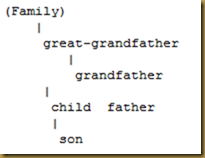
測試的結果:
參考資料:


